How to Install an ATtiny Bootloader With Virtual USB
Contributors:
 Shawn Hymel
Shawn Hymel 
Resources and Going Further
While this is a lot of information to take in, it shows how to hack the Arduino IDE to load custom board definitions. These steps should work for other ATtiny devices that are supported by the micronucleus project, such as:
You might have to modify the pins_arduino.h file, however, if you plan to use a different ATtiny.
ATtiny84 Pinout
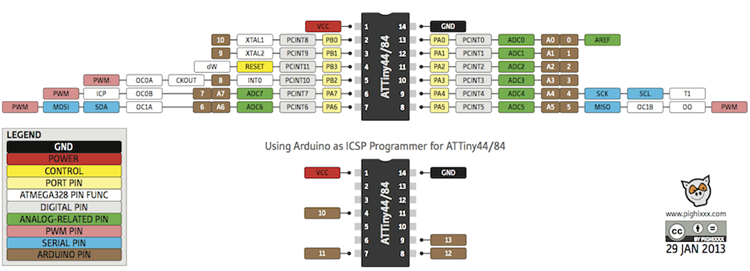
If you need additional support, please check out the following resources.
If you want to go further with the ATtiny, please check out our additional tutorials that showcase the ATtiny:
Wake-on-Shake Hookup Guide
A basic hookup guide for getting started with the SparkFun Wake-on-Shake. The board gives you the ability to put your project into hibernation until bumped or shaken awake using the ADXL362 accelerometer. This means you can design projects meant to stay inert for long periods of time, possibly even several years, depending on the battery type used to power the project.
Re-Programming the LilyTiny / LilyTwinkle
A quick tutorial showing how to reprogram the ATtiny85 IC found on the LilyTiny or LilyTwinkle boards.
Roshamglo Project: TV-B-Gone
Turn your Roshamglo board into a (nearly) universal TV power button.
Qwiic Joystick Hookup Guide
Looking for an easy way to implement a joystick to your next Arduino or Raspberry Pi project? This hookup guide will walk you through using the Qwiic Joystick with the Arduino IDE on a RedBoard Qwiic and in Python on a Raspberry Pi.