What's the difference between the ZED-F9P and the ZED-X20P?

Software Changes
Firmware Upgrade
As mentioned about the USB interface, above, it is only possible to perform firmware updates through the UART1 interface for the ZED-X20P.
Firmware upgrade through I2C (Qwiic) is possible, but is only for advanced users. You need (e.g.) a Thing Plus board running a sketch to convert USB UART to I2C. Then you need to run the u-blox ubxfwupdate.exe from the command line with some special settings.
u-center Application
One of the biggest changes between the two GNSS receivers is the u-center software application. u-blox recommends their new u-center 2 software application for any GNSS engine, generation 10 or later.
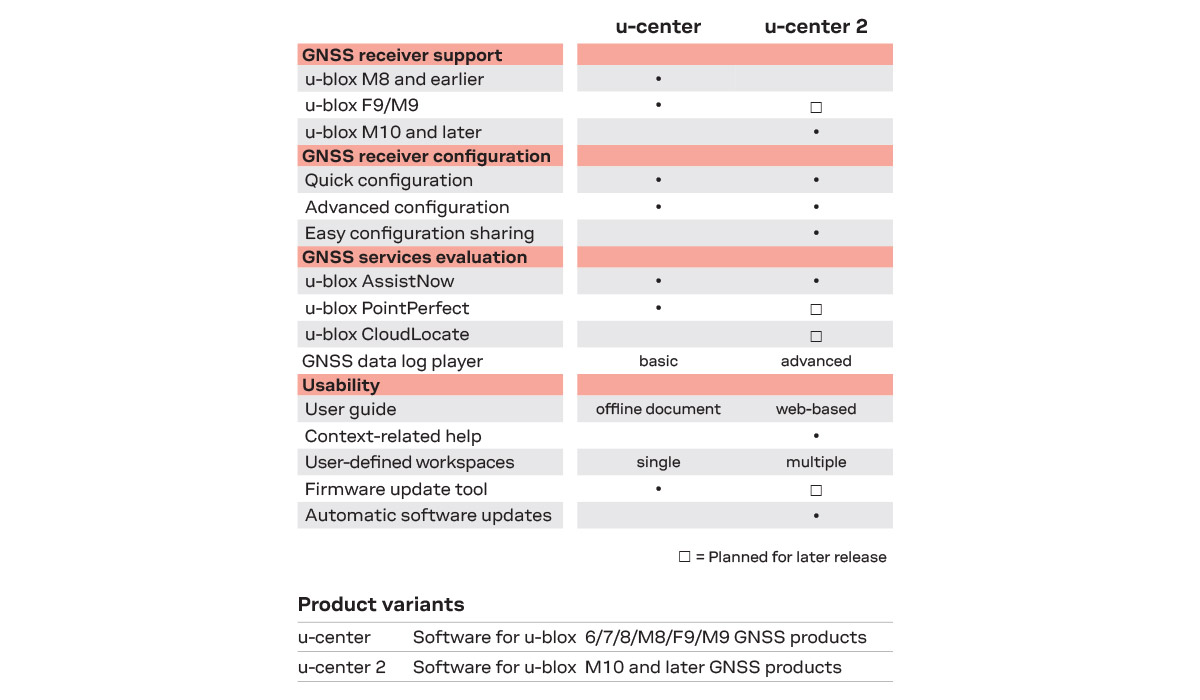
The first difference between the two applications is that users will notice is a required user account for u-center 2. While users will need internet access to initially login, users will not need internet access or to login afterwards.
Beyond a new look and feel, the primary difference in functionality between the two applications is that the new generation 10 GNSS engines implement a new set/get method for the values in the configuration layers of the GNSS receiver. This is handled in the backend of the software application, but should be noted for any development purposes.
Some other notes to mention:
- With the new workspace configuration allows users to save setups and layouts when testing different GNSS receivers.
- With the required login, u-blox also integrates their new PPP services and their support portal in the u-center 2 application for users.
- u-blox also wrote up this blog post with a few tips and tricks for the new software application.
Arduino Library
With the introduction of the set/get method for configuration values for the gen 10 GNSS engines, our Arduino library got a new release (v3). The Arduino library should be mostly backwards compatible, with a few minor changes, see below for more information: